reversi-utils
Overview
Provides reusable utilities and shared infrastructure used by all other Reversi modules (core, cli, storage, app). This module contains configuration management, environment constants, logging setup, and helper functions that promote code reuse and consistency across the project.
The module is intentionally minimal to avoid dependencies that would couple other modules. It provides only the essential cross-cutting concerns that multiple modules need.
Architecture
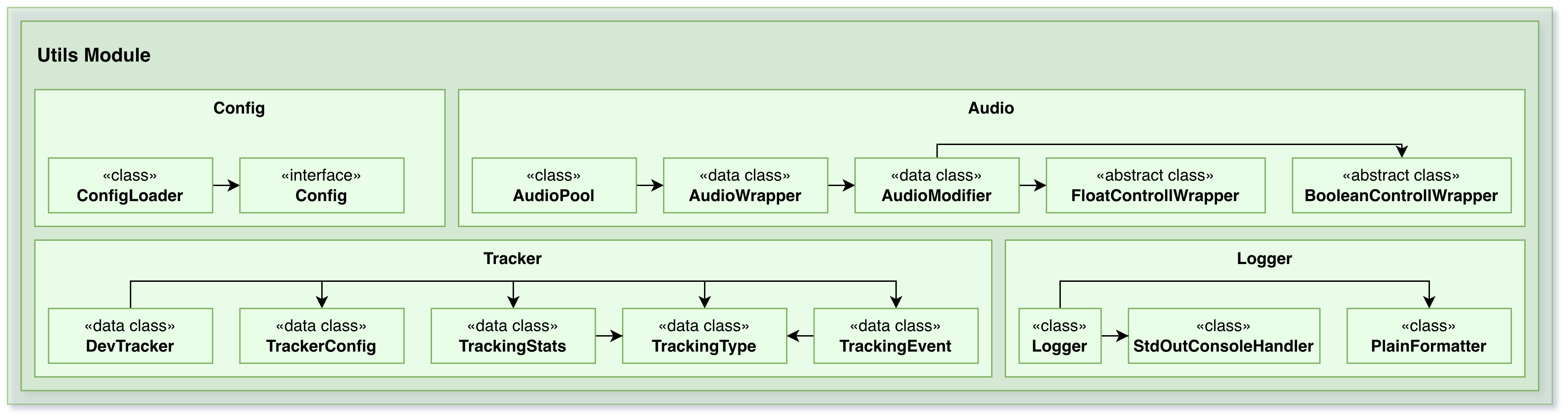
The module is organized into:
Configuration Management — ConfigLoader and Config interface
Environment Constants — Centralized path and folder definitions
Logging Infrastructure — Global logger setup
Audio Utilities — Sound system for game feedback (optional)
Helper Functions — Extension functions and utilities
Configuration Management
ConfigLoader
A generic configuration loader that:
Reads Java properties files
Auto-creates missing files with default values
Adds missing keys on each run
Converts properties to typed Config objects
Persists configuration back to disk
Process:
On first run: Creates file and writes default values from
getDefaultConfigFileEntries()On subsequent runs: Reads file, adds any missing keys with defaults, updates file
Returns a fully populated Config object
Example:
val loader = ConfigLoader("config/myapp.properties") { props ->
    MyConfig(props)
}
val config = loader.loadConfig()Config Interface
Implemented by modules to define their configuration:
map: Map<String, String>— All configuration propertiesgetDefaultConfigFileEntries(): Map<String, String>— Default values to use when keys are missing
Examples:
CoreConfig(reversi-core) — Game logic configurationCliConfig(reversi-cli) — CLI appearance (colors, prompt)
Each module can independently define and manage its configuration.
Environment Constants
Directory Structure
data/
├── config/
│   ├── reversi-core.properties
│   ├── reversi-cli.properties
│   └── reversi-app.properties
├── crash/
│   └── REVERSI-CRASH-{date}.log
├── logs/
│   └── reversi-app-{date}.log
└── saves/
    ├── game1.txt
    ├── game2.txt
└── ...Constants
BASE_FOLDER = "data"— Root directory for application dataCONFIG_FOLDER = "data/config"— All configuration filesCORE_CONFIG_FILE = "data/config/reversi-core.properties"— Core configurationCLI_CONFIG_FILE = "data/config/reversi-cli.properties"— CLI configurationAPP_CONFIG_FILE = "data/config/reversi-app.properties"— App configurationBASE_LOG_FILE_NAME = "logs/reversi-app"— Log file prefix
These centralized constants prevent hardcoding paths throughout the codebase.
Logging Infrastructure
Global Logger
val LOGGER: Logger = Logger.getGlobal().apply {
    useParentHandlers = false
    level = Level.ALL
    addHandler(StdOutConsoleHandler().apply {
        level = Level.ALL
        formatter = PlainFormatter()
    })
}Features:
Configured with
StdOutConsoleHandlerfor console outputUses
PlainFormatterfor simple, readable formatAll log levels are captured (Level.ALL)
Used throughout the application for consistent logging
Usage:
LOGGER.info("Game started: $gameName")
LOGGER.warning("Invalid move attempted")
LOGGER.severe("Failed to load configuration")Logging Components
PlainFormatter
Formats log messages in plain text:
No complex metadata
Human-readable timestamps
Clear level indicators
Compact output suitable for console
StdOutConsoleHandler
Outputs log records to standard output:
Writes to System.out
Captures all levels from configured logger
Audio System (Optional)
AudioWrapper
Manages sound playback:
Loads audio files
Controls volume
Plays sounds during gameplay
AudioModifier
Modifies audio properties:
Pitch adjustment
Volume control
Playback speed
Audio Controls
BooleanControlWrapper— On/off controlsFloatControlWrapper— Continuous controls (volume, pitch)
These allow the application to provide audio feedback without forcing the feature on users.
Helper Functions and Extensions
Utility Functions
makePathString()— Constructs file paths with proper separatorsExtension functions for common operations
String formatting utilities
These small helpers promote consistency and reduce boilerplate.
Design Principles
Minimal Dependencies — Only essential cross-cutting concerns
No Dependency Cycles — Can be used without importing other modules
Convention Over Configuration — Sensible defaults for standard paths
Extensible — New modules can provide their own Config implementations
Separation of Concerns — Configuration, logging, and utilities are independent
Type Safety — Strongly typed Config implementations
Usage Patterns
Using Configuration in a Module
Create Config implementation:
class MyModuleConfig(override val map: Map<String, String>) : Config {
    val myValue = map["myKey"] ?: "default"

    override fun getDefaultConfigFileEntries() = mapOf(
        "myKey" to "default"
    )
}Load configuration:
val loader = ConfigLoader("data/config/mymodule.properties") { props ->
    MyModuleConfig(props)
}
val config = loader.loadConfig()Logging from Any Module
LOGGER.info("Something happened")
LOGGER.warning("Watch out!")
LOGGER.severe("Error occurred")Using Constants
val configPath = File(CONFIG_FOLDER)
val logFile = File(BASE_LOG_FILE_NAME)Integration
The utils module is used by:
reversi-core — Configuration loading for game logic
reversi-cli — CLI configuration and logging
reversi-storage — Path constants and utilities
reversi-app — All utilities and configuration
The utils module has NO dependencies on other modules (except Kotlin stdlib), making it safe to use anywhere without creating circular dependencies.
Packages
This package contains reusable utilities that support configuration handling, logging, and audio management. The central feature is a ConfigLoader class that automates the creation and loading of configuration files in .properties format, allowing each subsystem to define its own configuration model by implementing the Config interface. This ensures that each module can provide default configuration values while still allowing users to override them through editable files.