reversi-app
Overview
A modern desktop GUI application for playing Reversi using Jetpack Compose for Desktop. This module provides a rich, interactive user experience while maintaining clean separation from the core game logic and storage systems. The app follows MVVM (Model-View-ViewModel) architecture with reactive state management for responsive, testable code.
The module builds upon the immutable core domain model and storage layer, providing a layer of UI logic and user interaction management. All game rules and state are delegated to the core module, keeping the app lightweight and focused on presentation.
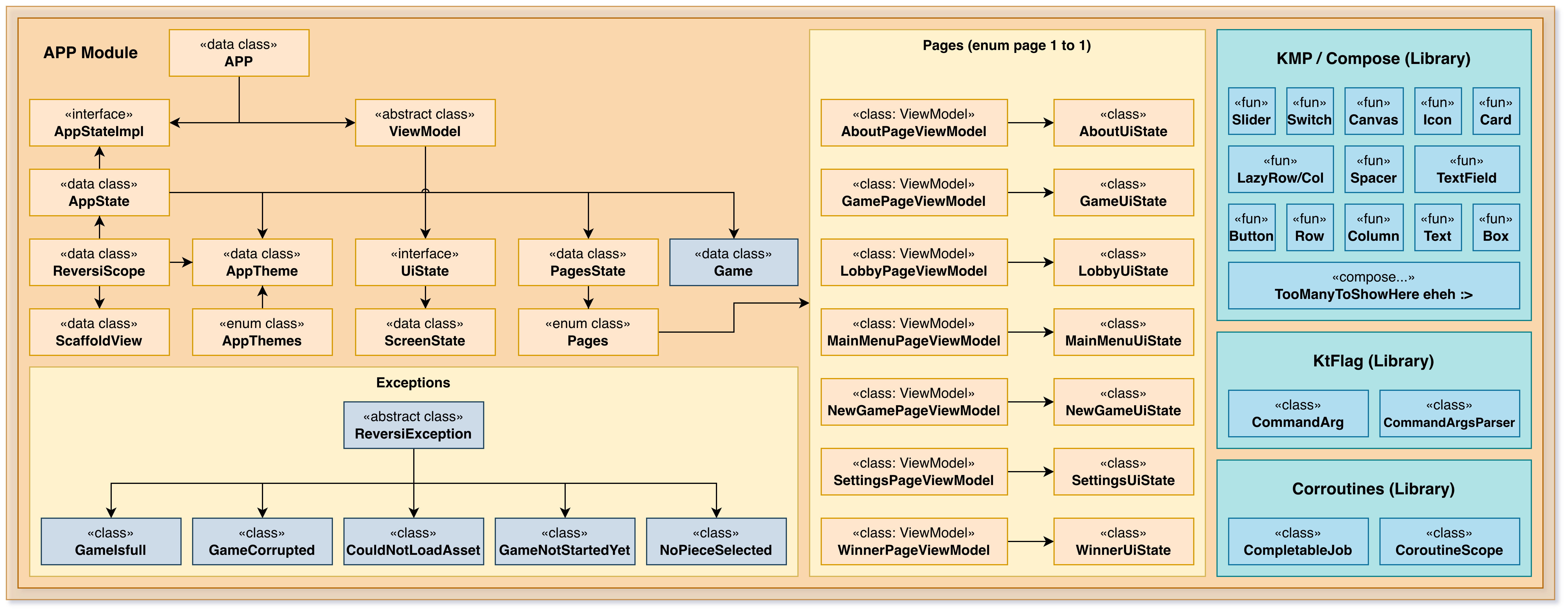
Architecture
The app is organized into layers:
Main Entry Point — Application initialization and window setup
UI Pages/Screens — Individual game screens and menus
ViewModels — State management and business logic coordination
UI Components — Reusable Compose components
Configuration — App-specific settings and theming
MVVM Pattern
ViewModel Layer:
Manages state for each screen
Coordinates between UI and core logic
Handles user input (moves, commands)
Manages coroutines for async operations
Exposes state as observable flows
View Layer (Compose):
Renders UI based on ViewModel state
Sends user events to ViewModel
Handles animations and transitions
Provides visual feedback
Model Layer (Core):
Immutable Game and GameState objects
Pure game logic (via core module)
Persistence (via storage module)
Key Components
Main Application
The entry point that:
Initializes configuration
Creates the main window
Sets up theming and styling
Launches the root composable
Manages application lifecycle
Pages/Screens
Menu Screen
New Game creation
Load Game selection
Settings
Exit
Game Screen
Interactive board display
Piece rendering with colors
Legal move highlighting
Player scores
Game state display
Move submission
Pass button
Game menu
Game Over Screen
Winner announcement
Final scores
Play Again option
Menu option
ViewModels
Each screen has a corresponding ViewModel:
MenuViewModel:
Available games list
New game parameters
Navigation state
GameViewModel:
Current game state
Board representation
Available moves
Player information
Move execution coordination
GameOverViewModel:
Winner determination
Final statistics
Return to menu
Composable Components
Board Display:
Grid layout for 8x8 board
Piece rendering with symbols/colors
Legal move highlighting
Clickable squares for move input
Animations for piece placement
Player Info:
Current player indicator
Score display
Piece color indicators
Turn status
Buttons and Controls:
Move buttons
Pass button
Game menu button
New Game button
Load Game button
User Experience
Visual Feedback
Board highlights legal moves
Pieces animated when placed
Colors distinguish Black and White
Turn indicator shows who plays next
Score updates in real-time
Game Flow
Start app → See main menu
Create new game or load saved game
View board with current player highlighted
Click square to play move
Move executes with animation
Board updates with captured pieces
Turn passes to other player
Repeat until game ends
See final score and results
Return to menu to play again
Save/Load
Current game auto-saves to storage
Can resume interrupted games
Load screen shows all saved games
Delete games from UI
Reactive State Management
Uses Kotlin Flow for reactive updates:
Board state flows to UI
Player scores flow to UI
Available moves flow to UI
Game over state flows to UI
All updates are immutable and predictable
Benefits:
UI automatically updates when state changes
Testable state transformations
No callback hell
Easy to implement undo/redo
Easy to implement multiplayer
Configuration
Reads from reversi-app.properties:
Theme settings (colors, fonts)
Animation speeds
Board display options
Default game parameters
Audio settings
Accessibility options
Integration
The app integrates with:
reversi-core — Game logic and types
reversi-storage — Save/load functionality
reversi-utils — Configuration and logging
Jetpack Compose — UI framework
Kotlin Coroutines — Async operations
Advantages Over CLI
Visual Board — Much easier to understand board state
Click Interface — Faster than typing coordinates
Live Feedback — Immediate visual response
Animation — Shows piece captures visually
Save/Load UI — Browse saved games
Multi-player Friendly — Can rotate device for hotseat play
Modern Look — Attractive, native desktop appearance
Design Principles
Separation of Concerns — UI, logic, and persistence are separate
Immutability — State is immutable; changes create new objects
Reactivity — UI automatically responds to state changes
Testability — ViewModels can be tested without UI
Responsiveness — Heavy operations run in background coroutines
Reusability — Components can be used in multiple screens
Composability — Large screens built from small components
Testing
Unit Tests:
ViewModel logic without UI
State transitions
Move validation
Configuration loading
UI Tests (Future):
Component rendering
User interaction
Visual regression
Accessibility
Integration Tests:
Full game flow
Save/load round-trips
Config persistence
Future Enhancements
Potential improvements:
Network multiplayer (play against remote opponent)
AI opponent using minimax or neural network
Game statistics and analytics
Elo rating system
Game replay and analysis tools
Custom board sizes
Themes and customization
Sound effects and music
Undo/redo during gameplay
Move suggestions/hints